
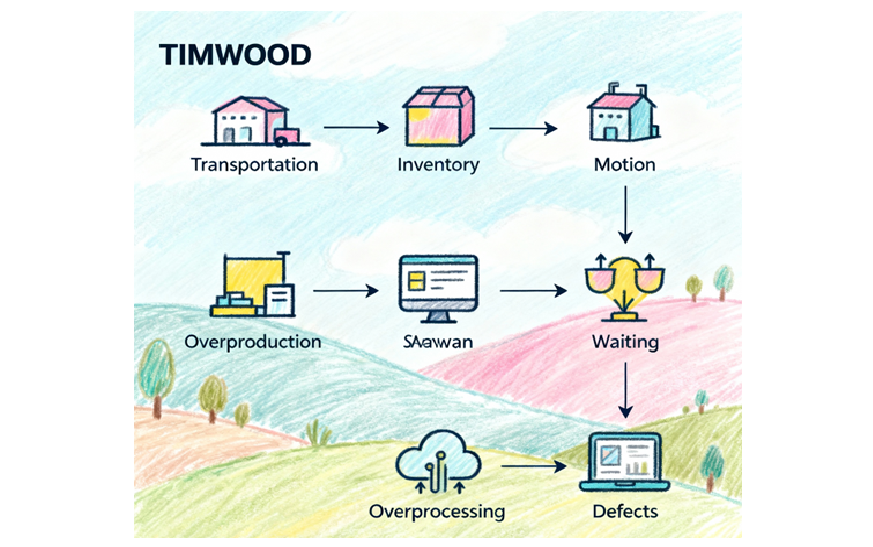
Let’s set the scene. You’re racing for a critical product launch. The backlog is overflowing, everyone’s working late, and the whole team’s glued to Slack troubleshooting last-minute bugs. But as the launch window slips, you dig deeper—and realize what’s really choking up the works isn’t just a technical snag, but good old-fashioned waste. In our case, it was inventory—three parallel feature branches, hundreds of “almost ready” user stories, and documentation piling up unused. Sound familiar? Welcome to Lean’s world, where the acronym TIMWOOD maps the seven deadly sins of hidden process loss.
TIMWOOD is a simple Lean lens that reveals waste hiding in plain sight. In tech, those seven deadly wastes show up inside our software development lifecycle, sprint ceremonies, deployment pipelines, and even leadership habits.
In this article, we’ll walk through TIMWOOD for tech and see how leading software and agile teams use Lean’s seven wastes to expose and eliminate hidden bottlenecks in their delivery flow. Along the way, you’ll get practical examples of how Lean waste shows up in agile software teams—and what you can do about it as an engineering or product leader
If you’re leading teams through this, you can also explore my leadership coaching for agile teams.
TIMWOOD Defined: The Seven Tech Sins
Before we get practical, here’s a quick refresher:
- Transportation: Moving work, code, or assets more than necessary.
- Inventory: Excess WIP (work-in-progress), unmerged code branches, or backlog bloat.
- Motion: Extra finger mileage—searching for files, switching tools, or redundant steps.
- Waiting: Delays for approvals, reviews, builds, or information.
- Overproduction: Building features or documents before they’re needed.
- Overprocessing: Doing more than what’s required—think too many reviews or fancy-but-useless automation.
- Defects: Bugs, errors, and rework that eat cycles post-release.
Lean thinkers have battled these for decades, but in tech, they take on a modern, digital twist.
The Phase-by-Phase Waste Hunt: TIMWOOD in Action
Let’s break TIMWOOD down by phases in the typical tech workflow—develop, test, deploy, retrospect—because waste creeps in at every turn.
1. Development
- Inventory: Think of the classic “feature freeze” panic, where a dozen branches are on ice while QA catches up. Unmerged code is pure inventory.
- Overproduction: Developers sometimes pre-build admin panels or integrations for “possible future needs,” which end up unused.
2. Testing
- Waiting: Build times, test environments set up, or waiting for a SME to approve test cases.
- Overprocessing: Overly elaborate test scenarios or duplicated testing scripts.
- Motion: Testers hunt through clunky legacy systems for requirements or use manual workarounds for broken tools.
3. Deployment
- Transportation: Shuffling artifacts between repos, environments, or even downloading/uploading assets instead of piping them through CI/CD.
- Motion & Waiting: ‘Works on my machine’ syndrome, endless hand-offs between DevOps and devs when scripts don’t quite align.
- Overproduction: Creating backup or rollback plans for edge cases that never happen.
4. Support & Retrospective
- Defects: If you’re fixing the same bug every other sprint because of “workarounds,” you’re deep in waste territory.
- Inventory: Support tickets pile up, or docs get drafted for features still in development.
- Overprocessing: Endless status reporting or post-mortem meetings with no real outcome.
Real Company Story: Shrinking Waste for Real Results
One SaaS company took a brutal hit releasing a new API. Their cycle times kept stretching—devs waited for code reviews, deployment scripts got tangled, and docs were often out of sync or duplicated.
What they found:
- Motion: Developers switched tools and repos dozens of times daily for approvals and context.
- Waiting: PRs (pull requests) sat untouched for days, piling up.
- Overprocessing: Code reviews included “cosmetic feedback” that didn’t impact function or value.
Their fix:
- Mapped the full workflow and whiteboarded every recurring delay.
- Implemented “Just-In-Time” work: no new dev until the current increment hit production.
- Cut code review to two focused passes—one for function, one for style, both time-boxed.
- Set up visual management: Kanban boards tracked all blockers in real time.
- Instituted weekly Kaizen reviews: retros that openly explored bottlenecks and prioritized one process hack each week.
The payoff? Cycle time dropped by 30%, and the team finally got to move from “busy” to “productive.” No more marathon nights on release week.
I see similar patterns in many coaching engagements with agile and software teams.
How Leading Teams Eliminate TIMWOOD’s Wastes
1. Just‑In‑Time (JIT) work
The best teams don’t use TIMWOOD as a poster; they use it to see where work is piling up in their software delivery flow. Then they use JIT to cut the queues—less WIP, fewer half‑done items, more work actually reaching production.
2. Visual management
They make waste hard to ignore. Simple boards, clear WIP limits, and a shared TIMWOOD lens mean everyone can see blockers, rework, and queues on the wall or screen instead of discovering them two weeks later in a status meeting.
3. Kaizen events
Kaizen isn’t a two‑day offsite, it’s a focused habit. Teams pick one or two real examples of TIMWOOD waste in their day‑to‑day development or DevOps work, try a small change, and then inspect the impact in their usual retro.
4. Standardization, not stagnation
They standardize just enough to keep flow smooth—definitions of done, review steps, deployment basics—so people aren’t reinventing the wheel every sprint. Those standards are a starting point to improve, not a rulebook carved in stone.
5. Empowered teams
Finally, teams are trusted to change how they work when they spot waste, instead of waiting for a reorg or a new tool. Leaders give them clarity, air cover, and support so TIMWOOD becomes part of everyday problem‑solving, not a one‑time workshop.
Visual: Waste Before and After
Here’s how TIMWOOD for tech might look when you visualize inventory waste in a real software team’s delivery flow.
[Before: Inventory]
Backlog —> 20 PRs Open —> 7 in Review —> 5 waiting on QA —> 2 ready for prod
[After: JIT Flow]
Backlog —> 3 PRs Open —> 1 in Review —> 1 in QA —> 1 ready for prod

[Impact: Less context-switching, more throughput, shorter release lead time]
Metrics That Matter
- Lead/Cycle Time: Days from start to production.
- WIP Limits: Work-in-progress per stage.
- Defect Escape Rate: Defects making it to production.
- Process Waste Tickets Closed: Number of waste removals logged per quarter.
- Sprint Velocity Recovery: Did reducing waste improve sustainable speed?
For a deeper look at measuring Agile performance beyond just velocity, see Agile Metrics: Beyond Velocity and Gut Feel.
Conclusion & Call to Action
If you’re hoping the “perfect” moment to address Lean waste will arrive, it won’t. Start small: get one team, measure waste honestly, and try one new experiment. You’ll find that with each step, delivery gets smoother, teams feel saner, and technical debt starts to melt away.
What’s your hidden TIMWOOD? Share your horror stories, process hacks, or proudest waste removal wins—anonymity guaranteed and learning amplified. With enough eyes, even the gnarliest Lean wastes don’t stand a chance.
References:
- The Lean Startup by Eric Ries
- Lean Software Development by Mary and Tom Poppendieck
- Industry resources: Leanscape on 8 Wastes, 6Sigma, BA-Guru examples, Adobe Lean insights, TheLeanSuite
- https://leanscape.io/8-wastes-of-lean/
- https://www.6sigma.us/lean-waste/timwoods-8-waste-of-lean/
- https://www.ba-guru.com/7-lean-waste-timwood/
- https://business.adobe.com/uk/blog/basics/8-wastes-of-lean
- https://theleansuite.com/blog/the-seven-wastes-of-lean